Sandustry Build Modes
Linear vs rectangular placement, launcher skip, and layout patterns that respect sand physics.
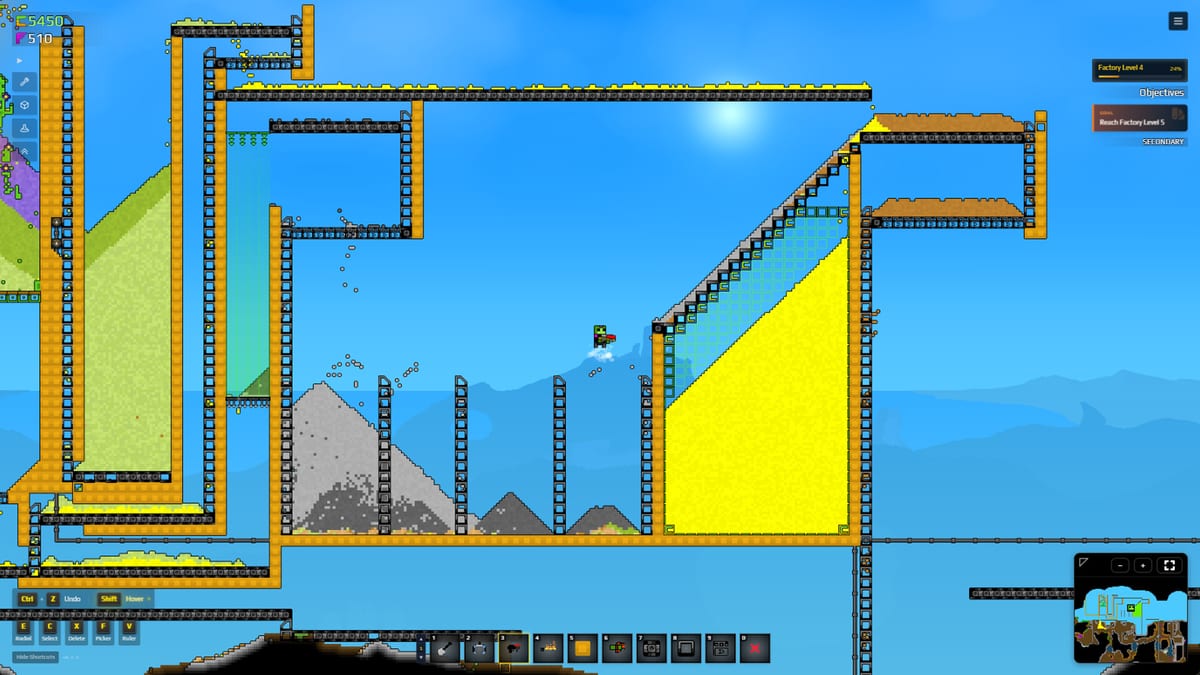
Press R in Sandustry to toggle between linear and rectangular build modes. The difference sounds cosmetic; in practice it separates fast refinery retrofits from sloppy platforms that block Gold drops. Build modes interact with Shift launcher skip, X removal, and Shift + drag marquee selection documented on Keyboard Shortcuts. Master all three before scaling Automation Basics.
Linear build mode
Places a line of the selected structure along your drag axis. Best uses:
- Conveyor spines feeding diagonal Shakers (How to Get Gold).
- Pipe runs from water source to mixers (Water Management).
- Launcher chains vertically — always combine with Shift to skip outlets so each launcher has a distinct output tile.
- Filter rows splitting mixed streams before refineries (Buildings).
Linear mode minimizes mis-clicks when precision matters. Draw from source to destination in one gesture; undo stray segments with X.
Rectangular build mode
Fills an area with repeated placements — ideal for:
- Platforms staging Wet Sand above shakers.
- Bulk flooring before rectangular machine grids.
- Quick walls containing water or lava during slag burn tests (Slag Processing).
Rectangular mode trades precision for speed. Avoid using it for diagonal shaker rows — orientation matters for gold separation, and rectangle fills tend to align grid-orthogonal unless you manually rotate intent.
When to toggle R mid-project
Experienced builders switch modes within one session:
- Rectangular a platform at the mine head.
- Linear conveyors from mine to mixer.
- Linear pipes parallel to conveyors.
- Manual diagonal shakers (often single placement, not bulk fill).
- Linear slag takeaway belts toward burn lane.
If gold output drops after a rebuild, check whether rectangular fill accidentally blocked fall paths — common beginner issue in Getting Started.
Shift skip on Launchers
Shift while placing Launchers skips the outlet cell. Without skip, nested launchers can converge on one tile, jamming Slag or Sand upward transport.
Pattern: Place launcher A, hold Shift, place launcher B offset so B’s intake does not overwrite A’s outlet. Repeat for elevator towers beside Logistics 1 spines.
Test towers with sand before connecting expensive shaker output — cheaper to X remove a bad launcher stack than to debug clogged gold.
Marquee select with build modes
Shift + drag selects existing structures independent of R mode. Workflow:
- Marquee old manual bins after conveyors arrive.
- Remove with X.
- Swap to linear mode for replacement belts.
Marquee does not change mode; it complements mode choice for demolition.
Ctrl + place — override and replace (Hotfix 8)
Hold Ctrl while placing a structure to replace or override an existing building on that tile without X removing it first. Use when:
- Upgrading funnel tiles around the Flux Emanator feed.
- Swapping conveyor segments in a live refinery wing.
- Replacing mis-rotated Filter outputs after 1-tile direction tweaks.
Documented in Hotfix 8 (2025-02-21) on Demo Patches. Pair with Keyboard Shortcuts for the full binding list.
Marquee improvements (Hotfix 8)
Hotfix 8 allows click-anywhere marquee selection — you no longer need to start drag boxes from a precise corner in every UI context. Bulk select still uses Shift + drag; the quality-of-life change speeds demolition before rebuilding in linear mode.
Build modes and research gates
| Research | Build impact |
|---|---|
| Refining 1 | Shaker placement — diagonal manual |
| Logistics 1 | Linear conveyors + launcher towers |
| Filters | Linear splitter branches |
| Pipes | Linear fluid runs, vent placement |
| Refining 2 | Press footprint — rectangular platform |
Unlock order: Research Priority. Modes are available from start; machines are not.
Physics reminders while building
Wet Sand needs headroom dropping onto shakers — rectangular ceilings too low choke flow.
Gold falls; Slag slides — diagonal shakers are manual orientation, not a mode toggle.
Liquids pool without Vents — rectangular basins need overflow plans.
Consult Materials when unsure how a bulk platform will interact with particles.
Demo and EA parity
Public demo and Early Access (2026-08-13) use the same R toggle and Shift launcher behavior per store listings. Patch changes would appear on Demo Patches. Modded maps (Custom Maps) inherit vanilla controls.
Practice drill (10 minutes)
- Toggle R ten times — observe preview shape change.
- Build a 20-tile linear conveyor.
- Rectangular a 5×3 platform at the end.
- Place two launchers with Shift skip; verify distinct outlets.
- Marquee and X the test structure; rebuild diagonal shakers for real gold.
Then continue to Production Ratio Helper when expanding.
Related
- Controls Hub — All bindings.
- Tier List — When logistics unlocks justify linear belts.
- Guides — Core loop using these modes.
- Tools — Track Logistics 1 purchase.
Frequently Asked Questions
Quick answers to the most common Sandustry questions.
What does R do in Sandustry?
Toggles **linear** vs **rectangular** build mode for placing structures.
Which mode is best for conveyors?
**Linear** mode — drag a single-file belt from source to destination.
Can I build diagonal shakers with rectangular mode?
Diagonal placement is manual orientation; avoid bulk rectangular fills that align shakers flat. See How to Get Gold.
How does Shift work with launchers?
**Shift** skips the outlet tile when placing launchers so chains do not overlap outputs.
How do I replace buildings in place?
Hold **Ctrl** while placing to override/replace existing tiles (**Hotfix 8**). Faster than **X** remove plus rebuild — Demo Patches.
How do I bulk delete mistakes?
**Shift + drag** marquee select, then **X** remove. Faster than tile-by-tile.